Paragraphs
How LaTeX handles lines and paragraphs — one sentence per line, paragraphs via blank lines.
- Example
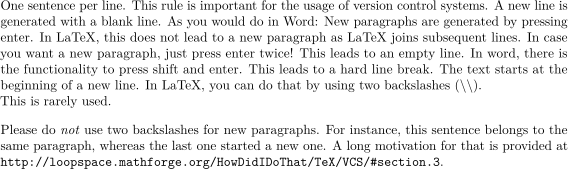
One sentence per line.
This rule is important for the usage of version control systems.
A new line is generated with a blank line.
As you would do in Word:
New paragraphs are generated by pressing enter.
In LaTeX, this does not lead to a new paragraph as LaTeX joins subsequent lines.
To start a new paragraph, press enter twice.
This leads to an empty line.
In word, there is the functionality to press shift and enter.
This leads to a hard line break.
The text starts at the beginning of a new line.
In LaTeX, you can do that by using two backslashes (\textbackslash\textbackslash).
\\
Running text seldom needs a hard line break.

Please do \textit{not} use two backslashes for new paragraphs.
For instance, this sentence belongs to the same paragraph, whereas the last one started a new one.
Andrew Stacey gives a long motivation for that in the section \enquote{Line Wrapping} of his \href{https://loopspace.mathforge.org/HowDidIDoThat/TeX/VCS/#section.3}{\emph{Document Revision System}}\footnote{\url{https://loopspace.mathforge.org/HowDidIDoThat/TeX/VCS/}}.